Set property deposit amount defaults
Each property can be configured to collect different deposit amounts for different types of deposits. Below are instructions for each different deposit type.
Application Deposits
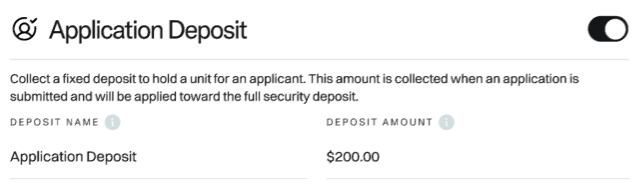
Here's how to set the deposit amount to collect when requiring an application deposit:
- Enable application deposits by clicking the toggle.
- Set a name for the deposit (the default is Application Deposit, but Holding Deposit is another common option).
- Set the deposit amount (it must be a fixed amount since Whale might not know the monthly rent at the point of application submission).
As soon as an application is submitted, Whale will request this amount from the primary resident when enabled.
Learn more about application deposits here.
Security Deposits
Here's how to set the standard and conditional deposit amounts for security deposits:
- Set the deposit invite trigger (i.e. when Whale should first request the deposit).
- Set the standard deposit amount. It can be a fixed amount or a multiple of monthly rent.
- (Optional) Set a conditional deposit amount and, if applicable, add a restriction to only request the conditional deposit if the conditional reason matches a specific text string. If no restriction is provided, all screening results marked as conditional will use the conditional deposit amount.
- (Optional) Set a fallback conditional deposit amount. This allows you to have two tiers of conditional deposit amounts if desired.
Learn more about security deposits here.

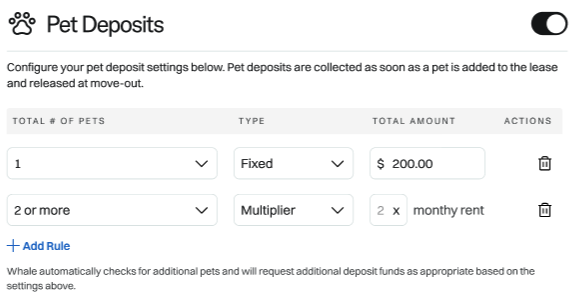
Pet Deposits
Here's how to set the deposit amount to collect when requiring a pet deposit:
- Enable pet deposits by clicking the toggle.
- For a total of 1 pet, specify the type (fixed or multiplier) and then the amount.
- Add additional rows for as many pets as you want to support.
As soon as a pet is added to a lease, Whale will request the amount based on the property's configuration.
Learn more about application deposits here.