Submit a move-out

The method for processing a move-out to return a renter's deposit differs depending on if your PMS is integrated with Whale or you're using a manual integration.

For PMS integrations

Follow these steps to process a move-out:

  1. In your property management system (PMS), complete the financial move-out for the lease (also known as deposit accounting).
  2. When the financial move-out is completed, Whale automatically reads the amount owed and will deduct that amount, up to the total amount held, from the renter's deposit.
  3. When you receive any move-out charges owed, post them to the resident's ledger (unless you're using Yardi in which case this is done automatically).

For manual integrations

Follow these steps to process a move-out:

  1. Log in to Whale Admin
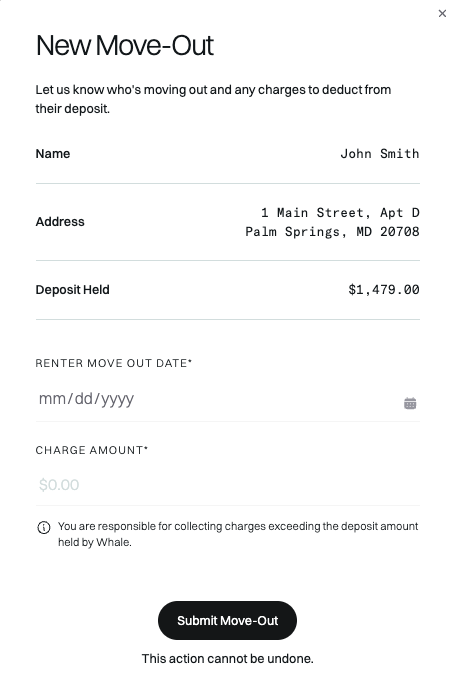
  2. Find the lease for the tenant moving out and under the “···” menu select "Move-out".
  3. Provide the move-out date (the date they vacated the unit) and the charges you'd like to deduct from their deposit.
  4. Click "Submit Move-Out".
  5. When you receive any move-out charges owed, post them to the resident's ledger.

Once you submit the move-out, the deposit, less any charges claimed by you, are immediately returned to the renter. This action cannot be undone.
Helpful resources related to the move-out process

Did this answer your question? Thanks for the feedback There was a problem submitting your feedback. Please try again later.

Still need help? Contact Support Contact Support